
Download URL Helper – Fast, Secure Video URL Finder for Windows
Overview
URL Helper is a lightweight Windows utility designed to expose hidden video and streaming URLs that are often buried inside JavaScript or ActiveX scripts. For anyone who has struggled to locate the direct link to a media file – whether for personal archiving, offline viewing, or simply to verify the source – URL Helper offers a quick, two‑click solution. The tool leverages the WinPCap library, which is bundled with the installer, so users do not need to hunt for additional drivers or configure complex network sniffers.
Once the application is running, it monitors network traffic generated by your browser and extracts URLs that match common media file extensions such as .mp4, .webm, .flv, .m3u8, and more. Each discovered link is color‑coded by file type, making it easy to spot the exact stream you need. While the program does not currently decode URLs hidden inside Flash objects, its ability to sift through JavaScript and ActiveX code is reliable and fast.
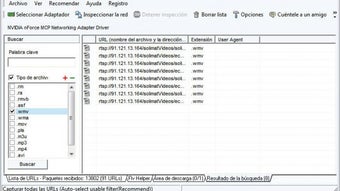
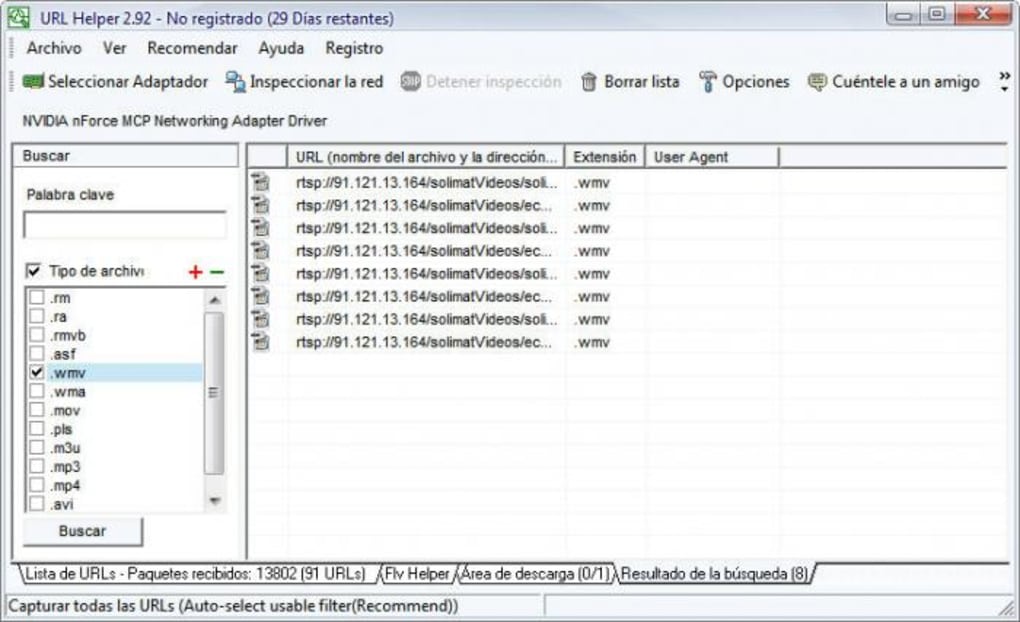
The interface is intentionally minimalistic: a start/stop button, a filter box for file extensions, and a results pane that updates in real time. Whether you’re a power user, a content curator, or just someone who wants to download a video that a site has tried to hide, URL Helper provides a secure, free, and straightforward way to get the URL you need.
Key Features of URL Helper
- Real‑time network sniffing: Captures HTTP/HTTPS traffic while you browse, instantly exposing media URLs.
- WinPCap integration: Bundled driver eliminates the need for separate installation steps.
- File‑type filtering: Quickly narrow results by selecting extensions such as .mp4, .avi, .mkv, .mp3, etc.
- Color‑coded results: Each file type appears in a distinct colour, helping you differentiate streams at a glance.
- Simple two‑click workflow: Start monitoring, play the video, stop monitoring – the URL appears automatically.
- Export options: Copy URLs to clipboard or save the list to a text file for later use.
- Lightweight footprint: Consumes minimal system resources, making it suitable for older machines.
- Secure operation: No background data collection; all traffic analysis stays on your local PC.
- Free for personal use: No hidden fees or trial periods, providing full functionality out of the box.
- Regular updates: Developers release patches to improve compatibility with newer browsers and streaming protocols.
How to Install and Use URL Helper
Installing URL Helper is intentionally straightforward. Follow these steps to get the tool up and running in under five minutes:
- Download the installer: Visit the official website and click the “Download for Windows” button. The file is a compact
.exepackage (~5 MB). - Run the installer: Double‑click the downloaded file. The setup wizard will ask for administrator permission because WinPCap requires low‑level network access. Accept the prompt.
- Accept the WinPCap license: During installation, you’ll see the WinPCap license agreement. Click “I Agree” to let the bundled driver install automatically.
- Choose the installation folder: The default location (
C:\Program Files\URL Helper) works for most users. You can change it if you prefer a custom path. - Complete the setup: Click “Install” and wait a few seconds while the files copy. When finished, you’ll see a shortcut on the desktop and in the Start menu.
- Launch the application: Open URL Helper. You’ll be greeted with a clean window containing a “Start Capture” button, a filter dropdown, and an empty results pane.
- Start capturing URLs: Click “Start Capture.” The button will turn red, indicating that the program is now monitoring network traffic.
- Play the video or stream you want: Open your browser, navigate to the target website, and start the video. URL Helper will silently listen and pull any media URLs that pass through.
- Stop capture and review results: Once the video begins playing, click “Stop Capture.” The results pane will populate with a list of URLs, each highlighted in a colour that corresponds to its file extension.
- Copy or export the URL: Right‑click any entry to copy it to the clipboard, or use the “Export” button to save the entire list as a
.txtfile.
The user interface also includes a quick filter box where you can type an extension (e.g., “mp4”) to instantly hide unrelated links. This is especially handy when a site serves multiple formats simultaneously. For advanced users, the program offers a command‑line switch (/silent) that launches URL Helper without the GUI, allowing integration with custom scripts.
System Compatibility and Pros / Cons
URL Helper is built exclusively for the Windows platform. It supports Windows 10, Windows 11, and the older Windows 7 (with Service Pack 1). The bundled WinPCap driver works with both 32‑bit and 64‑bit architectures, ensuring broad compatibility across legacy and modern machines. While the developers have not released a native macOS, Linux, Android, or iOS version, the Windows‑only focus allows the tool to remain lightweight and highly optimized for that environment.
Pros
- Fast, real‑time detection of hidden video URLs.
- No additional drivers required – WinPCap is included.
- Intuitive two‑click workflow suitable for beginners.
- Color‑coded results make it easy to spot the correct file type.
- Free for personal use with no hidden subscription fees.
- Low system resource usage; runs smoothly on older PCs.
- Secure and privacy‑focused – all analysis stays local.
- Exportable results simplify batch downloading.
Cons
- Only available for Windows; no macOS or Linux version.
- Cannot decode URLs embedded in Flash objects.
- Requires administrator rights for initial WinPCap installation.
- HTTPS traffic is captured only if the system’s SSL/TLS decryption is enabled (which may need extra configuration).
- Limited documentation beyond the basic user guide.
Frequently Asked Questions
Does URL Helper work with HTTPS streams?
Yes, URL Helper can capture HTTPS traffic, but the URL is revealed only after the SSL/TLS handshake completes. In most cases the tool will display the final media URL once the browser has decrypted the stream.
Is there any risk of installing WinPCap?
WinPCap is a well‑established library used by many network utilities (e.g., Wireshark). The bundled version in URL Helper is signed and does not contain telemetry. As with any driver, you should download it from the official site to avoid tampered copies.
Can I use URL Helper to download copyrighted material?
URL Helper merely reveals the underlying URL; it does not facilitate illegal downloading. Users are responsible for complying with the terms of service of the source website and applicable copyright laws.
What browsers are supported?
URL Helper works with any browser that routes traffic through the Windows network stack – this includes Chrome, Edge, Firefox, and Internet Explorer. The tool captures the data after the browser sends the request, so no special plug‑ins are required.
Is there a portable version of URL Helper?
Currently the official distribution is an installer that registers WinPCap. A portable version has not been released, but advanced users can manually copy the executable and the WinPCap DLLs to a USB drive.
Conclusion – Is URL Helper Worth Downloading?
For Windows users who regularly need to uncover hidden video URLs, URL Helper delivers exactly what it promises: a fast, secure, and free solution that works with minimal configuration. Its real‑time capture, clear colour‑coding, and easy export features make it a valuable addition to any power‑user’s toolkit. While the lack of macOS or Linux support limits its audience, the focused Windows implementation ensures a lightweight footprint and reliable performance. If you’re looking for a hassle‑free way to retrieve streaming links without diving into complex network sniffers or browser extensions, give URL Helper a try today.
Ready to start? Click the download button below, install the program, and begin uncovering the URLs you need in just a few clicks.
Download URL Helper – Free & Secure






